IRONSTICK — GDPR Data-Flow Declaration
Relations with External Large Language Models
Factual, code-derived description of every path on which data leaves
IRONSTICK towards an external LLM, what exactly is transmitted, in which form, and
where the pseudonymization layer applies. Windows desktop edition. This document
describes IRONSTICK's behaviour only — what the AI provider does with received
data is governed exclusively by the provider's own terms (the terms and
privacy policies of the providers the user has set up — Google, Alibaba Cloud,
Moonshot AI, OpenAI and/or Anthropic), which the user must review separately.
1. Scope and endpoints
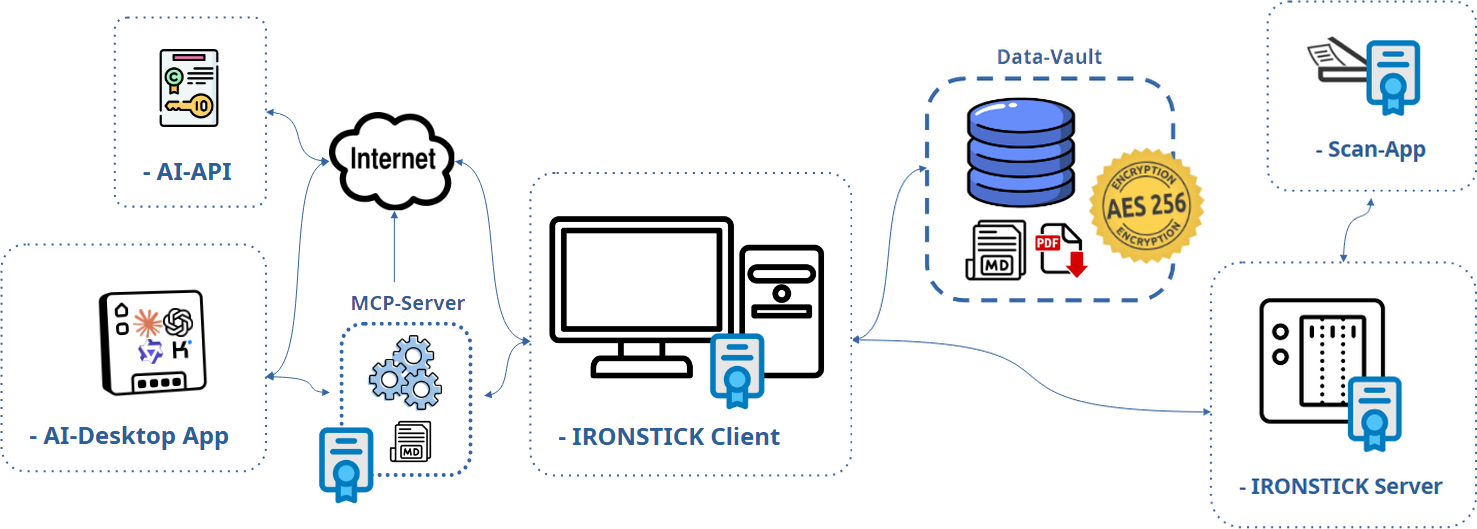
In-app external AI calls go to the provider the automatic cascade is
using at that moment. The user can set up up to five providers; every
provider that is set up is used automatically in this fixed, cost-saving
order: Gemini (Google) → Qwen (Alibaba Cloud) → Kimi (Moonshot AI) →
ChatGPT (OpenAI) → Claude (Anthropic). At every program start IRONSTICK
checks which of them respond; if a quota or credit runs out during the day, or
a provider stops answering, the very same request is repeated with the next
provider, which is then used for the rest of the day. The content transmitted
is identical on every provider (section 3 onwards: pseudonymized by the
router, consent, audit log). The endpoints are:
- Claude:
POST https://api.anthropic.com/v1/messages,
the user's own API key.
- ChatGPT:
POST https://api.openai.com/v1/chat/completions,
the user's own API key.
- Qwen:
POST https://dashscope-intl.aliyuncs.com/compatible-mode/v1/chat/completions
(Alibaba Cloud Model Studio, international region), the user's own API key.
- Kimi:
POST https://api.moonshot.ai/v1/chat/completions
(Moonshot AI), the user's own API key.
- Gemini (Windows only): no API key. IRONSTICK drives Google's own,
unmodified command-line client (Google Antigravity CLI) as a hidden local
process; the client is signed in with the user's Google account
(Google's own sign-in dialog — IRONSTICK never sees password or code) and
sends the request to Google under the user's Google AI plan. The client gets
no access to IRONSTICK's tools or files; it runs in an empty working folder
with a private profile folder inside the data directory, and its local
conversation records and logs are deleted after every call.
Gemini through a Google account is a consumer
service, not a commissioned-processing channel. According to the Google
Antigravity terms, Google may use interactions to improve its products and
machine-learning technologies, and Google staff may review them, unless the
user switches this off in the Google Antigravity settings; there is no
data-processing agreement for this path. IRONSTICK transmits the same
pseudonymized content as on the API paths, but a practice whose professional
rules require a data-processing agreement for every processor should not set
up Gemini — a provider that is not set up is never used by the cascade.
Three configurable model tiers are used per provider (small / medium /
large). A separate, optional channel is the
desktop connector (section 4.9): there, data flows into the user's own
local desktop AI (Claude Desktop / Claude Code, ChatGPT Desktop, Qwen
Desktop or Kimi Desktop), i.e. to that AI's provider (Anthropic, OpenAI,
Alibaba Cloud/Qwen or Moonshot AI/Kimi) under the user's own subscription/account with that provider. The
bridges may run in parallel — the same local MCP server can be registered
with Claude, ChatGPT, Qwen and Kimi at once, and they can work on the same case
simultaneously. IRONSTICK operates no server of its
own; no data ever flows to the software vendor. The optional office LAN
server (IRONSTICK SERVER, section 9) does not change this: it is
operated by the law firm itself, on the firm's own hardware, inside the
firm's own network — it never contacts the vendor and never contacts any AI
provider.
The master switch is the user's own access. In-app
external AI processing exists only if the user has opened their own account
with an AI provider and entered their own access key in the configuration
(for Gemini: signed in with their Google account).
Without any provider set up, no in-app external AI call can occur at all — every
feature described in section 4 then stays local or is simply unavailable. That
account is a direct contract between the user and the provider; IRONSTICK is
not a party to it. The same applies to the desktop connector, which requires
the user's own subscription/account with the chosen desktop AI provider
(Anthropic, OpenAI, Alibaba Cloud/Qwen or Moonshot AI/Kimi). Documents marked secret are excluded
from the connector's and the chat's tools, from the AI instruction
package and from every generated output (attachments, dossiers, exports);
their processing during capture follows the user's deliberate choice at
capture time (section 4.1).
Fully local (nothing leaves the machine): text extraction and OCR, the
deterministic local chat layer, global search, relevance radar, letter-chain
analysis, dossier/PDF generation, the redaction finder's local pass, and the
building of the AI instruction package.
2. The pseudonymization layer
Every in-app agent run can carry a pseudonymizer that tokenizes outgoing text,
translates tool arguments back for local execution, re-tokenizes tool results,
and de-tokenizes the final answer locally. The mapping lives only in memory, one
fresh mapping per operation; it is never persisted.
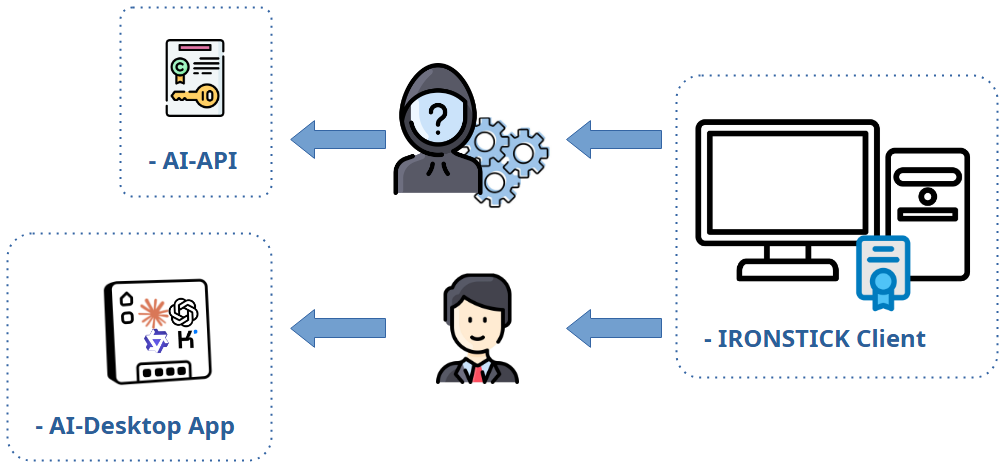
2.1 What is replaced
| Source | Fields | Token |
|---|
| Client records | name, CNP, phone, e-mail, address+city |
$PARTEI_A$, $CNP_A$, $TEL_A$, $MAIL_A$, $ADRESSE_A$ |
| Persons / entities | full name (person or company), CNP |
$PARTEI_B$ / $FIRMA_A$, $CNP_B$ |
| Cases | case number, opponent, claimant |
$FALL_A$, $PARTEI_C$… |
| Pattern layer (unknown values in free text) |
court file numbers (n/nnn/yyyy), 13-digit CNPs, IBANs, e-mail addresses,
plausible phone numbers | same token families |
2.2 What deliberately stays real
- Dates, times and monetary amounts — falsifying them was judged more
dangerous than transmitting them.
- Institution names (courts, authorities) — they are not in the
dictionary and are public bodies.
- Unknown third parties in free text — witnesses, doctors, lawyers,
judges or companies that are not stored as client/person/case records are not
recognized and go out in clear text. This is a documented boundary of the
approach.
- Addresses of non-clients — there is no address pattern; only the
client's stored address is tokenized.
- The entire factual content of documents (allegations, diagnoses,
narrative) — only identifiers are replaced, not the story.
2.3 Deliberate clear-name exceptions
- Person web research (stage 1) and form autofill for persons /
institutions: a web search for
$PARTEI_A$ is meaningless, so the
real name is sent by design.
- Redaction AI finder: it receives text that has already been redacted
locally, and must answer with the clear names of unknown third parties it
finds — pseudonymization is off for this one purpose.
- Read-aloud preprocessing (TTS): see 4.6 — sentences go out in clear
text.
- Desktop connector: raw data by design (section 4.9).
3. Consent moments and the audit log
Calls routed through the central router are consent-gated and logged: each
model round writes a row to the local audit table (T0_AiExtLog) with
the complete request and response in the tokenized form that actually left the
machine; refused/blocked attempts are logged without payload. The consent
dialog states model tier and approximate request size, and one approval covers
the current screen session (for document capture: the current program run).
Flows with automatic consent (no dialog): background
e-mail triage (continuous operation), the data consistency monitor's analysis
run, and the redaction AI finder (enabling its toggle is the consent). These are
still pseudonymized (except the redaction finder's intended clear-name answers)
and still audited.
Flows that bypass the router: the word processor's
AI functions, read-aloud preprocessing and the File→Markdown AI correction
call the API directly. They are pseudonymized (exception: read-aloud),
but they show no consent dialog of their own and write no audit-log
rows. The user's operation of these features (pressing the AI button,
starting a generation, starting read-aloud with the AI toggle on) is the
consent moment.
4. The data flows, use case by use case
4.1 Document capture
Text extraction and OCR are local. If an API key is configured, IRONSTICK asks
once per program run, then up to four call types run (all pseudonymized, all
audited):
- Main-document detection (small tier): raw OCR text in chunks of at
most 2,000 characters, maximum 8 calls — only for poor-quality scans.
- OCR correction (small tier): document text capped at 16,000
characters.
- Classification (medium tier): document text capped at 16,000
characters, plus system lists: the complete case list (case number,
client name, opponent — tokenized), a known-names pool capped at 2,000
characters (tokenized), and the institution-type and document-type code lists
(untokenized labels). Fallback: small tier, 8,000 characters, without the
lists.
- Contextualization on save (small tier): the document's metadata and
full text capped at 30,000 characters, plus an index line (ID, date, title ≤120
chars) of every active evidence item of the same client — used to ground
cross-references. Runs also for documents marked secret (deliberate user
decision).
4.2 E-mail monitor (triage)
Case assignment is deterministic first (case number or known registry number
found in subject/snippet — no AI call). Otherwise one small-tier call per
e-mail with exactly: sender name and address, subject, and the stored
preview snippet (hard-capped at 1,500 characters) — never the full body —
plus the complete case list (tokenized) as matching context. Answer: priority +
case number. In the e-mail screen this is consent-gated once per session; in
background operation it runs without a dialog (enabling the monitor is
the consent). Pseudonymized and audited in both modes.
No tracking pixels. Opening a mail in the monitor never contacts
the sender's server: images referenced by an internet address (including
invisible tracking pixels) are not loaded and appear as placeholders with a
notice, so the sender cannot learn when, how often or from which address a
mail was read. Only images embedded in the mail itself are displayed.
4.3 Person analysis (web research)
Three stages after a one-per-session consent:
- Stage 1 — search: local engines are queried directly; additionally the
provider's server-side web-search tool is invoked with the person's real
name in clear text (unavoidable for a search; logged in clear text).
- Stage 2 — page summaries (medium tier): per page, the person's name
(tokenized), the URL and the page content capped at 8,000 characters.
- Stage 3 — profile synthesis (large tier): name and city (tokenized)
plus every collected page text capped at 6,000 characters per source.
The result is stored locally with reliability "unconfirmed". The related
autofill buttons on the person/institution forms likewise send the typed
name in clear text (documented exception).
4.3a OSINT party check (osint_entity)
The OSINT check of a party is a fixed procedure the application runs
itself when a connected AI calls it with name, city, district, country and
natural/juristic person:
- Case files: a full-text search for the name across the local
database — purely local, nothing leaves the machine.
- Internet: a fixed list of search queries is sent to the public
search engines Google, DuckDuckGo and Qwant. Each query consists of a
search term in the language of the party's country plus the party's real
name in clear text and, for some queries, the city or district
(unavoidable for a search). No case, client or document content is
transmitted. The engines see the queries like those of any browser user.
- Gemini (only if set up): if the user has set up Gemini through the
Google sign-in, exactly one prompt is sent to Google — the request to
find everything about the named party from the named country — containing the
real name and the country in clear text and nothing else.
The result is returned to the calling AI as a prepared, unverified profile.
Nothing is written into the master data: every finding passes the review gate
of the data consistency monitor (section 4.5) and is adopted only when the
user accepts it. Only publicly accessible sources are evaluated.
4.4 Daily protocol
The screen itself is local. Importing free-form text runs a local
parser first; only when no protocol format marker is found does an AI fallback
normalize the raw text: the pasted text is sent completely (abort above 200,000
characters), small tier, consent-gated, pseudonymized, audited. Stored
protocols leave the machine only as tool results of the chat/connector
(capped excerpts) or inside the AI instruction package (section 5).
4.5 Data consistency monitor
Phase 1 (e-mail ↔ master data) is fully deterministic. Phase 2 sends one
small-tier call (pseudonymized, audited, no dialog, throttled to new
inbound documents) containing: all stored institution and person/entity
master records of the owner (IDs, names, contact data, CNP — tokenized where
in the dictionary; institution names clear), all party names from cases, and de-duplicated contact-region snippets (±~100 characters
around address/phone/tax markers) from inbound document full texts, capped at
130,000 characters in total. The answer only ever becomes a suggestion that the
user must accept in the monitor.
4.6 Word processor (AI assistance in the text)
- Revise selection: the selected sentence/paragraph/section (with
markup) plus the first 6,000 characters of the whole document as context
and the user's instruction — medium tier, pseudonymized.
- Structure/TOC: effectively the whole document as an indexed line list
(short lines in full, long lines truncated to 80 characters), capped at 40,000
characters — medium tier, pseudonymized.
- Read-aloud preprocessing: when reading a document aloud, every
sentence is sent individually to the small tier in clear text to expand
abbreviations and numbers — without pseudonymization (identification
numbers must return unchanged to be read correctly). File stamps and reference
markers are stripped locally first. Starting read-aloud is the consent
moment.
None of the word-processor calls show a separate consent
dialog or write audit-log rows (router bypass, see section 3).
4.7 Red/Blue Team review and dialogue summary (API)
Two further API flows belong to drafting. Red/Blue Team: if the user
has switched it on for the active provider (switch next to the API key; a saved
key is required), every formal document handed over via
deliver_file — from the in-app chat and from the desktop
connector alike — is read once more by the same provider as opposing counsel
(medium tier). Transmitted: the draft text, the date and the case's
jurisdiction; pseudonymized through the router and audited like every router
call; no separate dialog — the switch is the consent; at most two rounds per
file, after the second round the file is handed over regardless, with the
reviewer's report attached for the user. Dialogue summary: in long chat
sessions the older part of the dialogue (only the user's questions and the
model's final answers, never tool results) is condensed by the active provider
(small tier, background) into a 2,000-character summary that replaces the raw
history; it is stored encrypted in the scratch store and overwritten each
time.
4.8 AI chat (external, API)
Consent once per chat session; medium tier with automatic escalation to the
large tier (the whole context is then sent again); pseudonymized; every round
audited. Each turn transmits: the system prompt (static rules), the live GUI
context (current screen, open case/client incl. client name — tokenized),
up to 10 AI-memory entries of the open client, the most recent dialogue
capped at 6,000 characters plus a 2,000-character summary of older turns
(4.7) and the list of the chat's scratch files. Every tool the model calls
returns its result into the API conversation — including document full texts
(capped at 10,000 characters per item; larger results are written to the
encrypted scratch store and read in portions), e-mail bodies and
daily-protocol excerpts. Since September 2026 the chat uses the same tool
layer and the same delivery gates as the desktop connector (4.9): pleading
verification, Red/Blue Team (4.7) and hand-over through the export dialog —
what leaves the system is a submission-ready template. The local chat layer
answers routine requests without any transmission.
Two convenience tools deserve explicit mention. get_weather
fetches current weather data for a named place from the non-LLM service
Open-Meteo (section 7) — only the place name / its coordinates are transmitted
to that service, never case or person data. get_my_location
answers exclusively from the most recent locally stored security
snapshot (section 8): the AI's request triggers no new external lookup —
it only reads what is already on disk. As with every tool, what these tools
return flows back into the AI conversation, i.e. to the AI provider.
4.9 Bridge to a local desktop AI (Claude Desktop / Claude Code / ChatGPT
Desktop / Qwen Desktop / Kimi Desktop) — OPTIONAL add-on modules
Each desktop-AI access is an optional module, purchased separately.
It exists only where the practice has acquired and installed the respective
bridge module; without any module, the connector section stays locked in the
configuration, the local endpoint never starts, and none of the flows
described in this section can occur. The same local STDIO MCP server can be
registered with Claude Desktop/Claude Code, ChatGPT Desktop,
Qwen Desktop and/or Kimi Desktop — the mechanics below are identical for all; only
the receiving provider differs.
This channel transmits raw, unpseudonymized case
data. That is its purpose: the user's own desktop-AI session drafts
submission-ready templates and therefore needs real names and numbers.
- The desktop AI (Claude Desktop/Code, ChatGPT Desktop, Qwen Desktop or Kimi Desktop)
connects through a local bridge to the running app;
the HTTP endpoint binds to 127.0.0.1 only (localhost is the access boundary; the
stored token is not additionally verified).
- On the first data access per program run IRONSTICK shows a blocking consent
modal; refusal blocks the channel for 10 minutes. After approval the channel is
open for the rest of the program run.
- Over 170 tools — more than 100 of them read tools — expose chronicles, full texts, e-mails,
daily protocols, deadlines, master data, whole cases (in parts) and output
formats; documents marked secret are excluded. Write paths are review-gated
(master-data/relationship suggestions land in the consistency monitor;
AI-proposed changes to case-bound AI-instruction notes are presented as a
red/green diff inside IRONSTICK and applied only after the user explicitly
accepts — the decision is reported back to the AI) or explicit (hand-over into
the word processor, file delivery, navigation only if separately
permitted). The same review-gate pattern covers the two newer write paths:
chronicle entries are never written by the AI — it only PREFILLS the capture
form, which the user completes and saves himself; and an AI-healed document
full text (OCR re-scan, next bullet) replaces the stored full text only after
the user has seen the complete text in a confirmation dialog and saved it.
- OCR re-scan healing (local) and the PDF hand-over (user-initiated).
When a stored full text is truncated or ruined by an old OCR run, the AI may
request a fresh scan: the user picks the pages, the re-scan runs locally
(no new external recipient), and both text versions are staged in the local
scratch space; whatever the AI reads from them flows to its provider like any
other tool result. As an absolute last resort — only after such a re-scan and
only within hard bridge-enforced limits (≤ 10 MB, ≤ 90 pages) —
the AI may ask the user to hand it the original PDF file: IRONSTICK
only opens the entry; the user himself saves the PDF via the paperclip icon
and drags it into the desktop-AI chat. This transfers the document
as a file (including stamps, signatures and images) to that AI's
provider — it happens exclusively by the user's own deliberate action, never
automatically, and documents marked secret are excluded from the whole
re-scan channel from the start.
- Local AI scratch space (data minimisation). Any tool call may divert
its full result into a local, ephemeral scratch file (
to_scratch);
the AI then receives only the file path plus a short preview (≈1,200
characters) instead of the full text. Local editing tools
(search/replace/insert/diff/normalize) rework those files on the user's
machine, and delivery/update tools consume them by path — large content can
thus be transported and reworked without being transmitted to the AI
provider at all. Complete case dumps (dump_case_to_scratch)
and the one-call session-start protocol are likewise written straight to this
local area; only the portions the AI subsequently reads flow to its provider.
IRONSTICK additionally watches the freshness of these files and voids them
when the underlying data changes. The scratch folder lives inside the data
folder and persists across sessions (it is the AI's working context);
untouched files are purged after 180 days, and no new external recipient is
created.
- The scratch store is an encrypted vault (since September 2026).
Every file in the scratch store is AES-256 encrypted at rest, with the same
key derivation as the database and the document store. Reading and writing
pass only through IRONSTICK's gate; a plain-text file placed into the store by
any other route (a file-system tool of the desktop AI, a manual copy) is
refused, removed and reported to the AI as a rule violation; files leave the
store only through IRONSTICK's export dialog, never to a download folder.
Together with the encrypted database, document store and configuration file
this closes the last gap on the local machine: no case data lies
unencrypted on the user's disk — not even the AI's working files. A copied
disk, a lost stick or a backup archive in the wrong hands yields ciphertext
only.
- Tool results are delivered to the user's desktop-AI client and from there
to its provider: Anthropic for Claude (under the user's Claude
subscription and Anthropic's terms), OpenAI for ChatGPT (under the user's
ChatGPT subscription and OpenAI's terms), Alibaba Cloud/Qwen for Qwen
Desktop (under the user's Qwen account and Qwen's terms) or Moonshot AI for Kimi
Desktop (under the user's Kimi account and Moonshot AI's terms). IRONSTICK writes no
audit-log rows for bridge traffic; the top bar shows one pulsing logo per
active AI (Claude mark, ChatGPT mark, Qwen mark, Kimi mark) — simultaneous access is
possible and each is signalled separately. The bridge itself keeps a
purely local diagnostic log of its tool calls — timestamp, tool name,
success/failure and response size, never any content — in a plain file
next to the bridge program. This log is transmitted nowhere and serves
troubleshooting only.
- The shared AI memory stores distilled insights (≤1,000 characters each,
client-/case-bound, auto-expiring) locally; its content is visible to every AI
channel and is transmitted whenever those channels read it.
- Peer review between the desktop AIs runs through IRONSTICK, not directly
between the providers: one AI leaves a work product (e.g. a draft) in a
local, short-lived exchange buffer (plain files on the user's machine,
deleted when the task is closed and wiped completely on every app restart) and a
task note; the other AI reads it when the user directs it to. This creates
no new external recipient — whatever the reviewing AI reads is transmitted
to its own provider exactly as any other tool result above, under that
provider's terms. Content never passes from one provider to the other.
5. The AI instruction package (export ZIP)
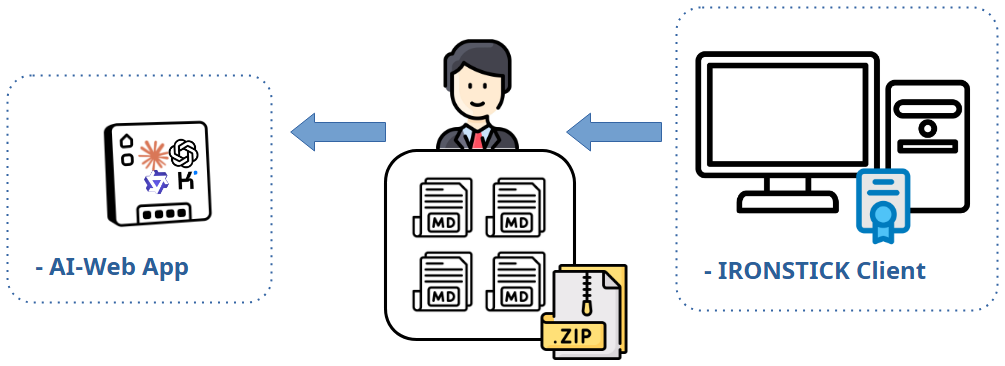
Building the package is local and involves no AI call. It produces
clear-text Markdown (no pseudonymization) intended to be uploaded by the
user to an external LLM of their choice. Content:
| File | Content |
|---|
| Cases | all cases of the selected client with parties, status and
evidence-ID index (no full texts) |
| Entities | all persons/entities of the entire practice (not
only this client) incl. CNP/CUI, birth date, full contact data, profession,
vehicle — plus the stored analysis blocks (assessment, vulnerabilities,
residences, finances, social environment, sources) |
| Institutions, Deadlines | all institutions; active deadlines with
case numbers and client name |
| Mail | the 100 most recent e-mails practice-wide: sender,
recipient, subject, attachment file names, snippet ≤500 characters (no full
bodies) |
| Daily protocol | last 10 days, practice-wide, incl. case
chronology of that window |
| Per case | one dossier per case: the complete chronicle with
document full texts (budget ~170 KB per file, then compact form), client and
party identifiers incl. CNP; plus all case background notes uncapped |
| Instruction files | five working-rule documents — no personal data |
What happens when this ZIP is fed to a foreign LLM:
the user personally transfers, in clear text, substantial parts of the entire
practice — client identities with national ID numbers, third-party profiles
including sensitive assessments, practice-wide correspondence metadata and case
files — to that provider. From that moment the data is processed under the
foreign provider's terms (training use, retention, jurisdiction) entirely
outside IRONSTICK's control. IRONSTICK shows a privacy warning before the
export (once per program run) and offers the export also to Google Drive, which
additionally places the files with Google. The user acts as the transmitting
controller under GDPR and must ensure a legal basis (e.g. Art. 6, professional
secrecy rules) before uploading.
Documents marked secret are excluded from deadlines, daily protocols and case
dossiers.
6. Summary matrix
| Flow | What leaves (form) | Pseudonymized | Own consent dialog | Audit log |
|---|
| Document capture (4 calls) | OCR/document text ≤30k, case/name lists | yes | yes — once per program run | yes |
| E-mail triage (screen) | From/Subject/Snippet ≤1.5k + case list | yes | yes — once per session | yes |
| E-mail triage (background) | same | yes | no (monitor switch = consent) | yes |
| Person research st. 1 | real name (web search) | no — by design | yes — once per session | yes (clear) |
| Person research st. 2/3 | page texts ≤8k / ≤6k per source | yes | same consent | yes |
| Person/institution autofill | typed name (web search) | no — by design | yes — once per session | yes (clear) |
| Daily-protocol AI import | pasted raw text ≤200k | yes | yes | yes |
| Consistency monitor | master records + contact regions ≤130k | yes (instit. names clear) | no (throttled background) | yes |
| Word processor: revise / structure | selection + 6k context / doc lines ≤40k | yes | no (button = consent) | no |
| Read-aloud preprocessing | each sentence, clear text | no | no (start = consent) | no |
| Red/Blue Team review (API) | draft text + date + jurisdiction, per round (max 2) | yes | no (switch = consent) | yes |
| Dialogue summary (API) | older dialogue turns (user/assistant only) | yes | no (part of the chat consent) | yes |
| File→Markdown AI correction | converted text | yes | no | no |
| Redaction AI finder | already-redacted text; answers contain third-party clear names | off — by design | toggle = consent | yes |
| AI chat (external) | prompt + GUI ctx + memory + 6k tail + 2k summary + tool results ≤10k/item | yes | yes — once per session | yes |
| Desktop-AI bridge (Claude Desktop/Code, ChatGPT Desktop, Qwen Desktop, Kimi Desktop) | raw tool results (full case data) | no — by design | yes — once per program run, 10-min block on refusal | no (app side) |
| AI instruction ZIP | clear-text practice export (user-initiated upload) | no | warning once per program run | n/a |
7. Non-LLM external services (for completeness)
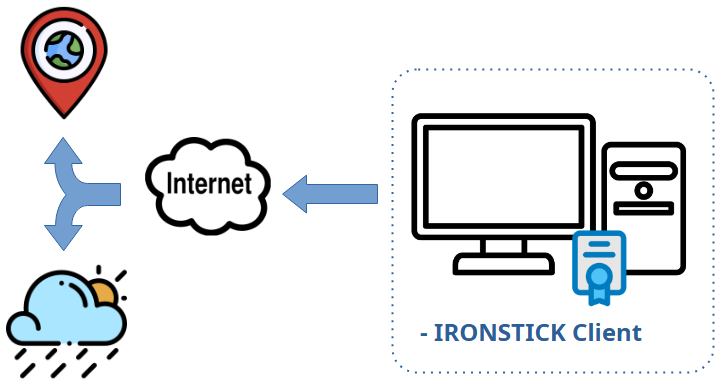
Independent of any LLM, the following features contact external services with
the minimum data needed: number validation (EU VIES, EORI, GLEIF, business
registers — the number being checked), geocoding of addresses (OpenStreetMap
Nominatim — the address), the person search's direct web queries (the name), IMAP (your mail server), and
optional exports to Google Drive (the exported files). None of these involve the
AI provider.
Two further services receive equally minimal data:
- ipwho.is (geo-IP lookup) — once per program start, as part of the
local security snapshot (section 8), IRONSTICK asks this service for the
machine's public IP address and a coarse location (city, country, ISP).
The outgoing HTTPS request carries no personal payload of any kind —
like any web server, the service sees only the IP address from which the
request arrives. The answer is stored exclusively locally and is transmitted
nowhere else.
- Open-Meteo (weather) — on request, the AI weather tool
(
get_weather, section 4.8) queries current weather data for a
named place. Only the place name / its coordinates are transmitted — never
case, client or person data.
Neither of these services involves the AI provider.
8. Local storage, integrity and user control
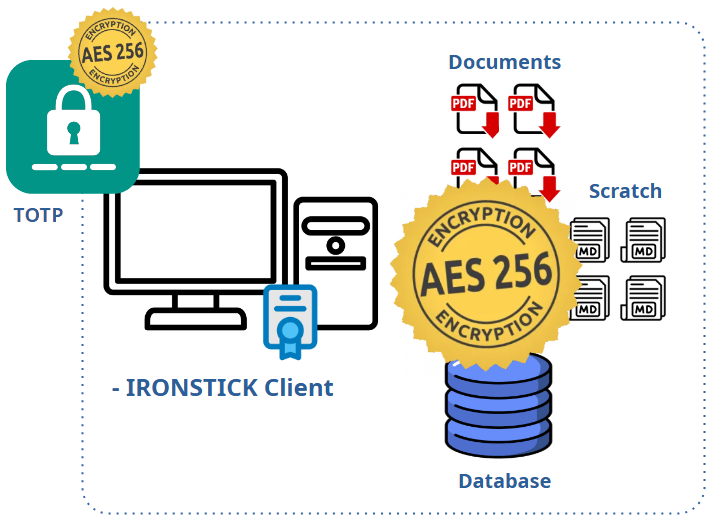
Independent of the AI channels above, the following applies to all
data IRONSTICK holds:
- Exclusively local storage. The entire data set — database, document
files, media, transcripts, configuration — lives in a single data directory at
a path the user defines. IRONSTICK requires no cloud account and operates no
server; the vendor never holds a copy of any user data. Where a practice runs
the optional IRONSTICK SERVER (section 9), that server too is the firm's own
device on the firm's own network — nothing about vendor access changes.
- Database encrypted at rest (AES-256). The database — the record
of clients, cases, chronicle, e-mails, deadlines, transcripts' text and the
AIs' memory — is stored encrypted with AES-256, every page individually and
with an integrity seal per page. The key is derived by the application at
run time and is never written to disk or configuration, so a database file
obtained from the medium or from a backup archive yields nothing without
IRONSTICK. This is a technical measure in the sense of Art. 32 GDPR that
applies without any user configuration and cannot be switched off.
- Documents encrypted at rest (AES-256). The document store — the
original PDFs, scans, images, audio and transcript files — is encrypted the
same way, file by file, with an integrity seal that detects alteration.
Reading happens through a single gate that decrypts the requested file
into a temporary working copy and removes those copies when the
application closes or starts. Backups and case packets carry the documents
in their encrypted form. Limits, stated plainly: the working copies of the
current session are clear text in the temporary folder (on Android that
folder lies in shared storage); exports and outgoing mail are clear text
by design; and the encryption protects against reading the medium outside
IRONSTICK, not against an authorised user of the application.
- Access control at start (TOTP). Once the license key is
accepted, the application shows nothing but a code prompt until the user
enters the current six-digit time-based one-time code from an
authenticator app (RFC 6238). The secret behind the codes is derived from
the license key at run time and is never written to disk; only a
non-secret fingerprint of the confirmed set-up is stored so the QR code is
shown again after a key change. Repeated wrong codes trigger a growing
wait. The desktop AI connectors receive no case data while the application
is locked. Recovery is by the license key, which makes the license key the
master credential of the installation — its custody is the operator's
responsibility. The configuration file (API keys, e-mail credentials,
server access) rests AES-256 encrypted with the same mechanism as the
documents and is decrypted in memory only.
- User-controlled storage location. The data path is chosen during
setup and can be changed at any time — including to a removable medium such as
an encrypted USB drive or an encrypted external disk. The application simply
follows the configured location; encrypting the medium (e.g. with the
operating system's disk encryption) is in the user's hands and is
recommended for portable media. One consequence to weigh deliberately: if the
chosen data directory lies inside a cloud-synchronised folder (e.g. Google
Drive), the entire data set including the configuration file with the AI
access key and e-mail credentials is synchronised to that cloud provider
under the provider's own terms — placing the data directory there is the
user's decision and responsibility.
- Device synchronisation without any cloud. The optional
Windows ↔ Android-tablet synchronisation runs over a direct USB
cable connection — no third-party service is involved, transfers are
checksum-verified, and a mandatory backup is taken before the database is
replaced. Documents marked secret are never transferred to the tablet at
all.
- Start-up security snapshot (local login log). At every program
start, IRONSTICK records in the background a snapshot of the machine it is
running on: host name, operating system, RAM/CPU, local IP address, default
browser, running remote-access tools it detects, and a derived security
score — plus, once per start, the public IP address and coarse location
(city, country, ISP) obtained from the geo-IP service ipwho.is (section 7).
The snapshot is stored exclusively locally in the database (table
T9_LoginLog) and is transmitted nowhere. Retention is limited
automatically to a maximum of 6 months and a maximum of 1,000
entries (daily housekeeping), and the user can inspect the log at any
time in the configurator (card «Login log»).
- Integrity fingerprints on every captured file. At the moment of
capture, every stored file receives a cryptographic content fingerprint
(SHA-256 for documents and media; a legacy MD5 fingerprint for transcript audio
files), recorded in the database next to the entry. Any later modification of a
stored file is therefore detectable by comparing the file against its
recorded fingerprint, and e-discovery exports (EDRM) carry these fingerprints
so that recipients can verify the files independently. This makes manipulation
evident; like any fingerprint mechanism, it does not physically prevent changes
to files on disk — it makes them provable.
- Backups at the user's discretion. A built-in backup function writes
a complete copy of the data (full backup or data-only backup) as a single ZIP
archive to any destination the user selects, and restores from such an archive
on demand. How often backups are made, where they are kept, how long they are
retained and whether the archives are additionally encrypted is entirely the
user's decision (the database and the document files inside every archive are AES-256
encrypted in any case) —
IRONSTICK imposes no schedule and transmits backups nowhere.
- Generated documents belong to the user. The user can generate
documents at any time — pleadings, letters, dossiers, lists, exports — and
download them: they are written to the local Documents folder or, where the
user has placed the data directory on a Google Drive folder or explicitly
selects Google Drive as a destination, to the user's own Google Drive account.
IRONSTICK's role ends with producing the file. Whatever happens to a
generated document afterwards — printing, filing with a court, e-mailing,
uploading to any service, sharing with third parties — is done by the user and
lies solely within the user's responsibility.
Allocation of responsibility. Because IRONSTICK stores
everything locally and transmits data only on the paths documented in sections
1–7 — each of them either pseudonymized, consent-gated, or triggered by a
deliberate user action — the operator of the practice is the sole data
controller: they choose the storage medium and its encryption, manage and
retain backups, decide which AI functions are enabled, give or withhold each
consent, and alone decide what is done with every document, export or backup
the software produces. AI-generated content — drafts, summaries, assessments,
classifications — is always a proposal that the user must professionally
review before relying on or dispatching it. This document exists so that every
one of those decisions can be made on full knowledge of the actual data
flows.
9. The optional office LAN server (IRONSTICK SERVER)
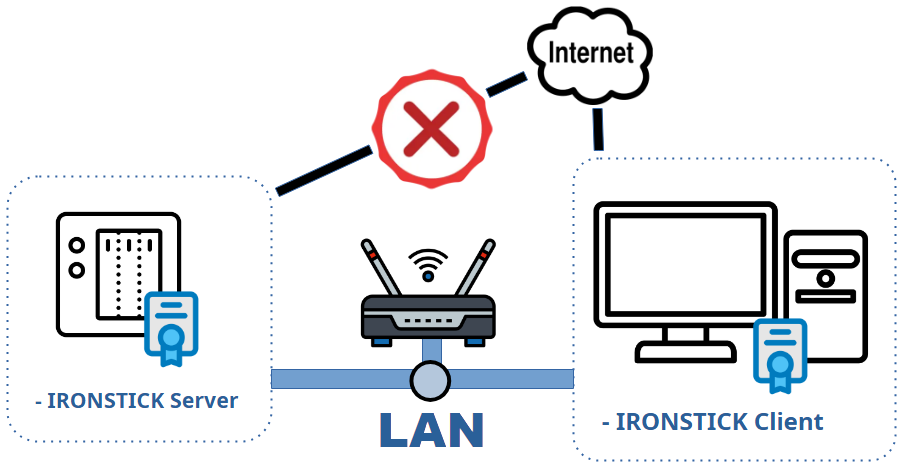
Practices with several IRONSTICK workstations can operate the optional
IRONSTICK SERVER — a coordination service running on the firm's own
Synology NAS, inside the firm's own local network. For the purposes of this
declaration the decisive facts are:
- No external party is involved. The server is the firm's own
device. It accepts connections only from private (local) network addresses
and never initiates any connection to the internet — no telemetry, no
update checks, no vendor contact. The software vendor has no access of any
kind.
- No AI involvement. The server carries no AI traffic, stores no AI
key and never communicates with any language-model provider. All AI channels
described in sections 1–6 remain strictly per-workstation; the
pseudonymization layer, the consent gates and the audit log are unaffected
by the server's presence.
- What the server stores — all of it on the NAS, under the firm's
control: (a) shared case packs — only cases a user explicitly
released for colleagues; documents marked secret are excluded by design and
never reach the server; (b) the central legal library — public
statute texts as Markdown, each with the contributing user's name, source
link and review date; (c) time-tracking records — per user, day and
case: case number, client name and minutes, reported by each workstation in
the background; (d) presence totals per user and day, derived from
session heartbeats; (e) case-event metadata — shares, revocations,
subscription starts/ends and exports, each with date, time and LAN IP
address; (f) a security log with administrative and login events,
including LAN IP addresses; (g) case hand-over parcels — when a user
transfers case ownership to a colleague, the complete case travels as one
archive through a server parking area («spool»); the parcel is deleted from
the server after the recipient has confirmed the import, and documents
marked secret travel only after the owner's explicit additional
confirmation (otherwise the transfer is aborted); (h) the central
scan intake (optional Central Scan App): a registry of each user's
case numbers and display name (reported by the workstations as
matching material — never case contents) and a per-file document
spool holding scanned incoming mail addressed to one user until that
user's workstation has fetched and confirmed it, after which the server
copy is deleted; text recognition and recipient matching happen locally on
the scan workstation, without any AI; (i) backup event records —
each workstation reports its data-backup and restore events (kind, file
name, size, time, LAN IP), so the administrator can see per user when the
last backup was taken and remind users who fall behind; (j) the firm-wide
party directory («entity network») — the master records of
persons and companies, institutions, the relations between them and the
person analyses kept by the workstations, together with the queue of
change proposals exchanged between users. See the next point.
- The firm-wide party directory. As soon as a workstation is
connected to the server, its party master data (who is who: names,
identifiers, contact data, relations, person analysis) is uploaded
automatically and mirrored to every other workstation of the same firm,
so that each lawyer sees with whom the firm is already dealing and the firm
obtains a firm-wide conflict-of-interest view. Every record has exactly one
owner — the user who brought it in first; all other users hold a read-only
copy and can only send a change proposal, which the owner accepts or
rejects in the data monitor. If the owner cannot be reached for 48 hours,
ownership passes to the proposing user. Case contents are not part of
this directory — documents, chronology, correspondence and case
assignments remain governed by the explicit share and hand-over actions
described here. The exchange stays inside the firm (one controller), never
leaves the local network and involves no AI provider: duplicate
detection and field comparison run as plain program logic on the sending
workstation; the server only stores and forwards. Firms should mention this
internal sharing of party data and person analyses in their record of
processing activities.
- Deliberate actions only — for case content. Case content reaches
the server exclusively through an explicit share or hand-over action
confirmed by the user; legal-library texts only after the user accepts the
entry in the data monitor; scanned incoming mail only after the office clerk
has reviewed the document and clicked send to a chosen recipient. The party
directory above is the one deliberate exception: it synchronises in the
background without a per-record confirmation. Time, presence, event and
backup records are operational metadata created by the multi-user operation
itself and are visible to the firm's administrator in the web admin.
- Controllership. The firm operating the server remains the sole
data controller. The administrator controls registration approval, can end
subscriptions, delete legal-library entries and uninstall the package —
which leaves the server data directory under the administrator's control on
the NAS.
- Client full names in time records. The time-tracking overview
shows working time per case and per client, which means client names are
stored on the NAS. This stays inside the firm's own infrastructure and its
existing confidentiality regime — but firms should include the NAS in their
technical-and-organisational-measures inventory (access control on DSM,
volume encryption, backup policy), exactly as they would for any office file
server.
Annex — Model clause for your client privacy notice (proposal)
The following text is a drafting proposal that a law practice using IRONSTICK
can copy into its own client privacy notice. It is written to be accurate to the
data flows described above — it promises no more protection than the software
actually provides. It deliberately avoids citations of statutory articles so it
can be pasted into notices of any structure.
Before you paste this — checklist for the lawyer:
- Have the data-processing agreement of every AI provider you have
set up in place, name in the clause only the providers you actually use, and
check the sentence on training and retention against the terms you actually
signed. The clause below does not cover Gemini through a Google account
(a consumer service without such an agreement, section 1) — if you set that
path up, it needs its own wording and normally the client's explicit
consent.
- Keep the bracketed sentence about the AI workspace only if you really use
the desktop-AI connector (Claude Desktop/Code, ChatGPT Desktop, Qwen Desktop
or Kimi Desktop); delete it otherwise.
- This clause covers the in-app flows described in this document. It does
not cover the AI instruction package (section 5) — uploading that export
to any AI service is a separate decision and will normally require the client's
explicit consent.
- If you have disabled individual AI functions in the configurator, shorten
the list of purposes accordingly — describe exactly what you use, no more.
- This is a drafting proposal, not legal advice. Have it reviewed against
your bar's professional rules and local data-protection practice before use.
English (master)
AI-assisted case processing. Our practice uses the case-management
software IRONSTICK, which includes AI-assisted functions. For these functions,
selected data from your file may be transmitted to an external AI service
provider (depending on availability: Alibaba Cloud, Moonshot AI, OpenAI or Anthropic, via their programming interfaces), which processes
it on our behalf under a data-processing agreement. We use these functions for:
classifying and registering incoming documents, prioritising incoming e-mail,
checking our records for inconsistencies, drafting and reviewing legal
documents, and legal analysis and research.
Protective measures. Before anything is transmitted, the software
replaces the direct identifiers stored in our system — names, personal
identification numbers, telephone numbers, e-mail addresses, postal addresses,
case numbers and bank details — with neutral placeholders on our own computer.
The table linking placeholders to real data never leaves our office, and the
provider's answers are translated back locally. Only what the specific function
requires is transmitted, within fixed size limits. A small number of functions
technically require real data — for example public web research on a person's
name, or the read-aloud function; we use these only through a deliberate
individual action. [Optional — delete if not used: For drafting court documents
we additionally use an AI workspace in which case data is processed without
placeholder replacement; this channel is only ever used under our direct
supervision.]
The provider. Under the provider's terms applicable to us, content
transmitted through the programming interface is not used to train AI models
and is stored only for a limited period. Processing may take place outside the
European Economic Area; in that case the transfer is protected by the
safeguards agreed in our data-processing agreement with the provider. What the
provider may do with the data is governed by that agreement — not by the AI's
own discretion.
Your choice. Our professional duty of confidentiality remains
unaffected: beyond what is described here, no data leaves our practice. The
processing rests on the mandate you have given us and on our legitimate
interest in handling your case efficiently and accurately. You may object to
the use of the AI-assisted functions at any time; where feasible, we will then
handle your file without them. You also retain all your statutory
data-protection rights, including access, correction, deletion and complaint
to the supervisory authority.
This declaration was derived from the application source code
(pseudonymizer, external router, audit log, and each feature's transmission
path) and reflects the shipped behaviour of the described version. Processing by
the AI provider itself — retention, training use, sub-processors, jurisdiction —
is governed solely by the provider's terms — the links to each provider's
terms and privacy policy are in the corresponding section of the AI
configuration (Google Antigravity: antigravity.google/terms; Alibaba Cloud:
alibabacloud.com/help/en/legal; Moonshot AI: platform.kimi.ai/docs/agreement;
OpenAI: openai.com/policies). For Anthropic services consult, in
their current versions: the Commercial Terms of Service
(anthropic.com/legal/commercial-terms),
the Usage Policy
(anthropic.com/legal/aup) and
the Privacy Policy
(anthropic.com/legal/privacy).
 IRONSTICK← Home